Technology
- Home
- Technology
- News
Microsoft Office can now be controlled with Logitech’s MX Creative Console
Logitech has announced a new suite of Productivity Plugins for its entire MX line of accessories, including its Stream Deck alternative, the MX Creative Console. Since the console launched in September 2024, Logitech has been expanding its capabilities with p…

Published 6 ماہ قبل on مئی 2 2026، 2:00 شام
By Web Desk
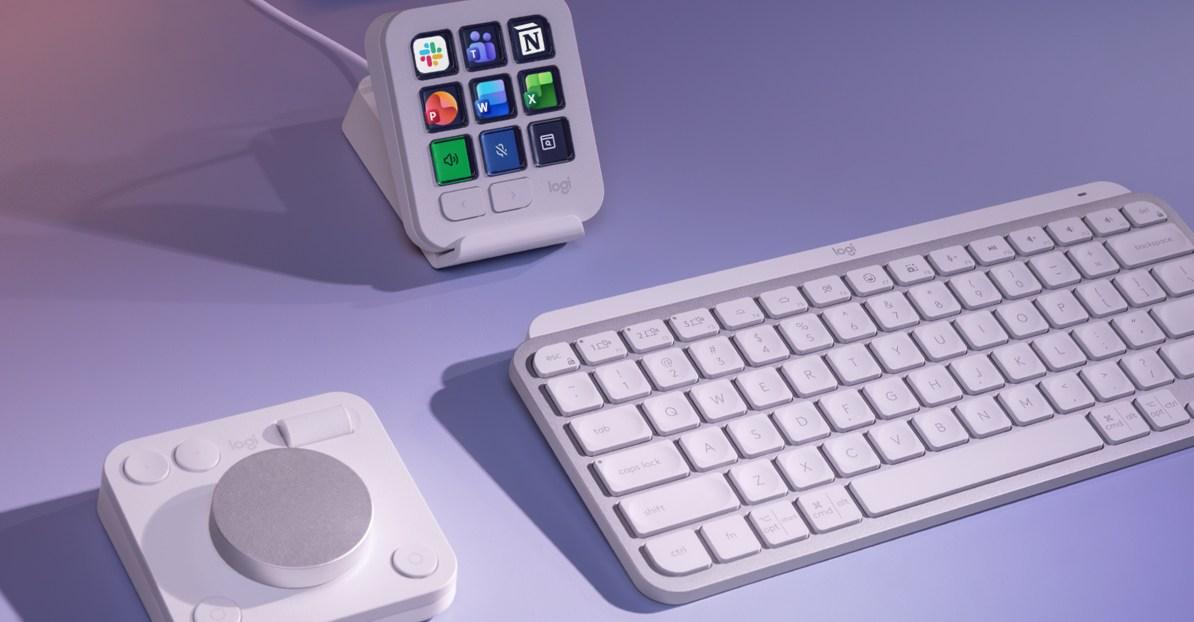
Logitech has announced a new suite of Productivity Plugins for its entire MX line of accessories, including its Stream Deck alternative, the MX Creative Console. Since the console launched in September 2024, Logitech has been expanding its capabilities with plug-ins that support creativity-focused apps such as Final Cut Pro, Adobe Lightroom, and Figma. That is now expanding to include productivity apps, such as Microsoft Office’s Word, Excel, and PowerPoint, as well as Slack and Notion.
Shortcuts, actions, and specific tools in those apps can be quickly accessed using Logitech’s Actions Ring menus, which are supported by accessories like the MX Master 4 mouse and the MX Mechanical Mini keyboard. The Action Rings are available through the Logi Options Plus app, which is also used to customize and personalize the functionality of various Logitech accessories.
[Image: You can create custom buttons to control many features of Word, Excel, PowerPoint, Slack, and Notion through the MX Creative Console. https://platform.theverge.com/wp-content/uploads/sites/2/2026/04/logitech_plugins2.jpg?quality=90&strip=all]
With the MX Creative Console, you can create dedicated buttons for common functions across the newly supported apps, such as replacing text in Word, inserting cells in Excel, switching Slack workspaces, or formatting to-do lists in Notion. The new Productivity Plugins are now available for free through the Logi Marketplace.
[Media: https://www.youtube.com/watch?v=i7iajg9JnoY]
Alongside the new plug-ins, Logitech also announced improvements to its Easy Switch feature, allowing accessories such as mice and keyboards to connect to and switch between multiple computers. Instead of having to press the Easy Switch button on every device you want to switch, the Logi Options Plus app can be configured so that pressing the button on the MX Keys S or MX Keys Mini keyboards automatically switches an MX mouse and the MX Creative Dialpad, too. One press of the button can move up to three devices. Logitech says a firmware update will be needed for the accessories you want to use with this feature, and it plans to expand support to additional keyboards in the MX line in the future.

Can machines be war criminals?
- 24 minutes ago

Republicans are trying to make the Texas Senate race about “manliness”
- 24 minutes ago

It’s time to find a new browser
- 2 hours ago

France eyes investment in Pakistan’s power transmission network
- 7 hours ago

France eyes investment in Pakistan’s power transmission network
- 7 hours ago

Meta delays new business terms after publisher pushback on AI scraping
- 2 hours ago

VisionQuest is what happens when AI really goes rogue
- 16 hours ago

Laika has spent 20 years building up to Wildwood
- 2 hours ago

Microsoft’s new Surface Laptop Ultra update fixes reboot and display bugs
- 2 hours ago

OpenAI announces three big science discoveries and a new way to work with academics
- 2 hours ago

Can Trump block the Alaska Senate election?
- 24 minutes ago

Zen Browser is the Arc replacement I was looking for
- 2 hours ago
You May Like

Trending