Technology
- Home
- Technology
- News
YouTube made its video player easier to navigate on TVs
The YouTube watch screen has been given a new look on TVs. The redesign aims to provide a "more intuitive experience with easier navigation," according to YouTube's announcement, relocating the video title and several controls, and adding a new "Description" …

Published 10 months ago on Dec 17th 2025, 5:00 am
By Web Desk
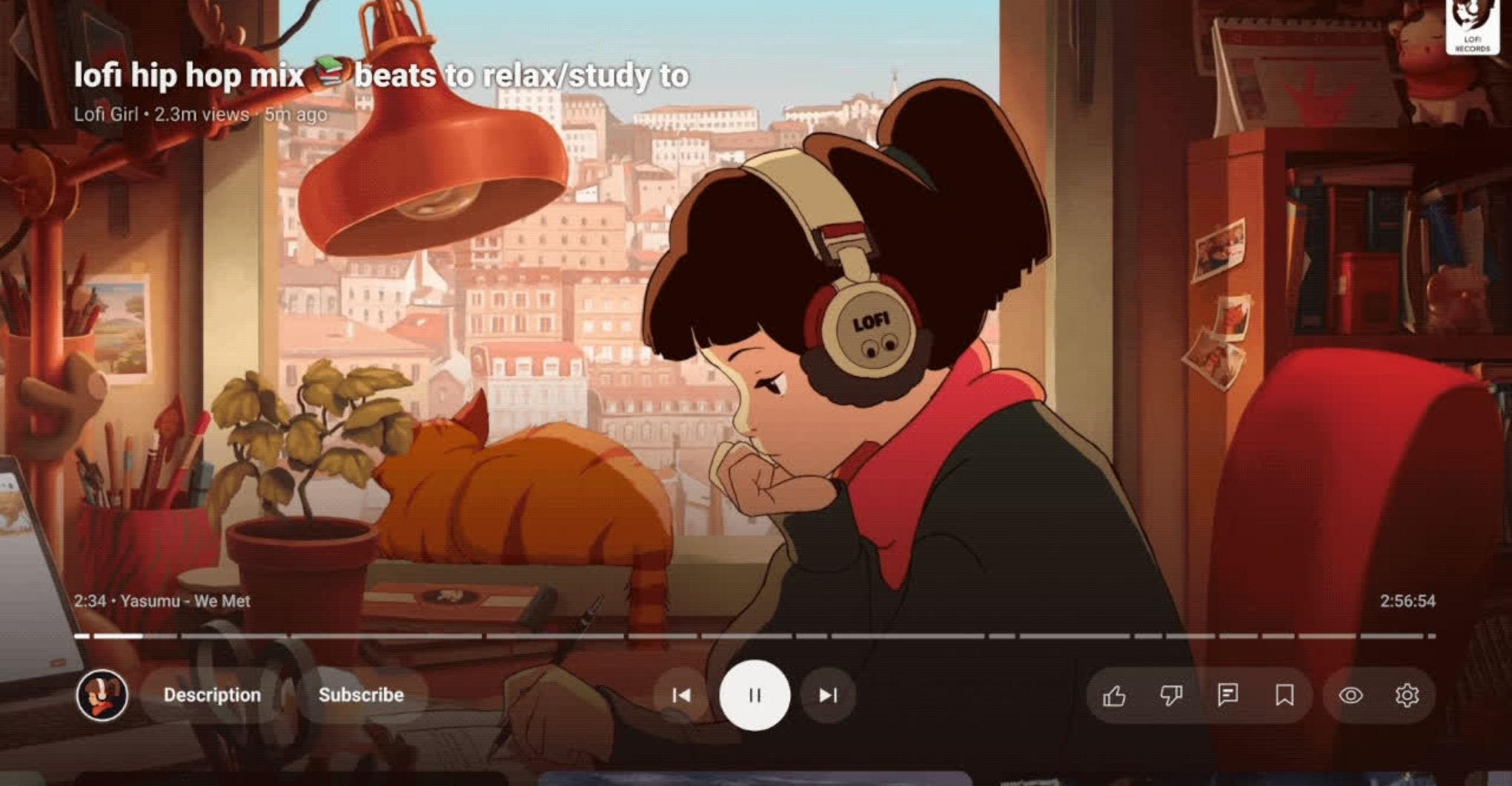
The YouTube watch screen has been given a new look on TVs. The redesign aims to provide a “more intuitive experience with easier navigation,” according to YouTube’s announcement, relocating the video title and several controls, and adding a new “Description” button to access creator information and other video features.
I’m already seeing the update on my own Nvidia Shield Pro streaming box and native Phillips TV OS, and I do think it makes it easier to find specific video features and controls. My colleague Thomas Ricker says he isn’t seeing the redesign in Apple TV’s YouTube player, however, so they may still be rolling out. These changes are pretty delayed, considering YouTube announced in April that they would arrive “this summer.”
Videos on the YouTube app for TV will now show the title in the top left corner of the screen instead of just above the video scrubber at the bottom of the page, and the title can no longer be clicked to open comments, metadata, and information about the creator. Instead, those controls are now available by clicking the new “Description” button. The channel thumbnail and subscribe function have also been separated into two buttons, with the creator’s thumbnail now taking users directly to their channel.
Controls have been reorganized into distinct groups under the video scrubber: Channel, Description, and Subscribe on the left, Previous, Pause/Play, and Next in the center, and Like, Dislike, Comment, Save, Closed Captions, and Settings placed into two groups on the right. YouTube says the Subscribe button will remain visible to subscribers, adapting to flag pay-gated content or alert users to new livestreams. A “Multiview” control has also been added for live sports content, while Music and Premium subscribers will see a new “Display Mode” control.

This chart shows just how rapidly Ebola is spreading
- 10 hours ago

Major European mobile carriers are teaming up for a ‘direct’ satellite program without Starlink
- 12 hours ago

AMD is bringing FSR 4.1 to Xbox consoles and handhelds
- 12 hours ago

Why your health insurance is dropping GLP-1 coverage
- 10 hours ago
Some Google Home Speakers caught downloading hundreds of gigs of data
- 12 hours ago

Pakistan, Qatar, Indonesia, Turkiye Sign 'Badr' MoU
- 18 hours ago

Two killed, 8 injured in attack on airport in Saudi oil city Dammam
- 41 minutes ago

The French youth revolt
- 10 hours ago
Trump is coming for your credit card rewards. That’s good.
- 10 hours ago
We can finally hear some of Wu-Tang Clan’s Once Upon A Time in Shaolin album
- 12 hours ago
Bluesky’s AI tool now lets you make games and apps to share on social
- 12 hours ago

The case for data centers, explained by a person who wants you to like them
- 10 hours ago
You May Like
Trending